How to record a Zoom, Teams or Meet call on a Mac — both sides
A meeting recording has two halves that live in different places: everyone else arrives as system audio, and you arrive through your microphone. Capture one and you get a monologue; capture both and you get the conversation. This is how to do it on a Mac, with any calling app — and what to check before you press record.
Get RedLight
Capture the call and your own voice. Free to try — one purchase unlocks unlimited recording.
Before anything else: consent
Recording a conversation is regulated, and the rules differ by country and by US state — some require everyone on the call to agree, not just you. Your employer's policy may add more. Say you're recording, get agreement, and keep it to calls you have the right to capture. RedLight has no view on this; the responsibility is yours.
The setup, once
- Wear headphones
This is the one that ruins recordings. With speakers, your microphone picks up the other participants a second time, slightly delayed — it sounds hollow and there is no fixing it afterwards. Any wired or USB headphones will do.
- Turn the microphone on
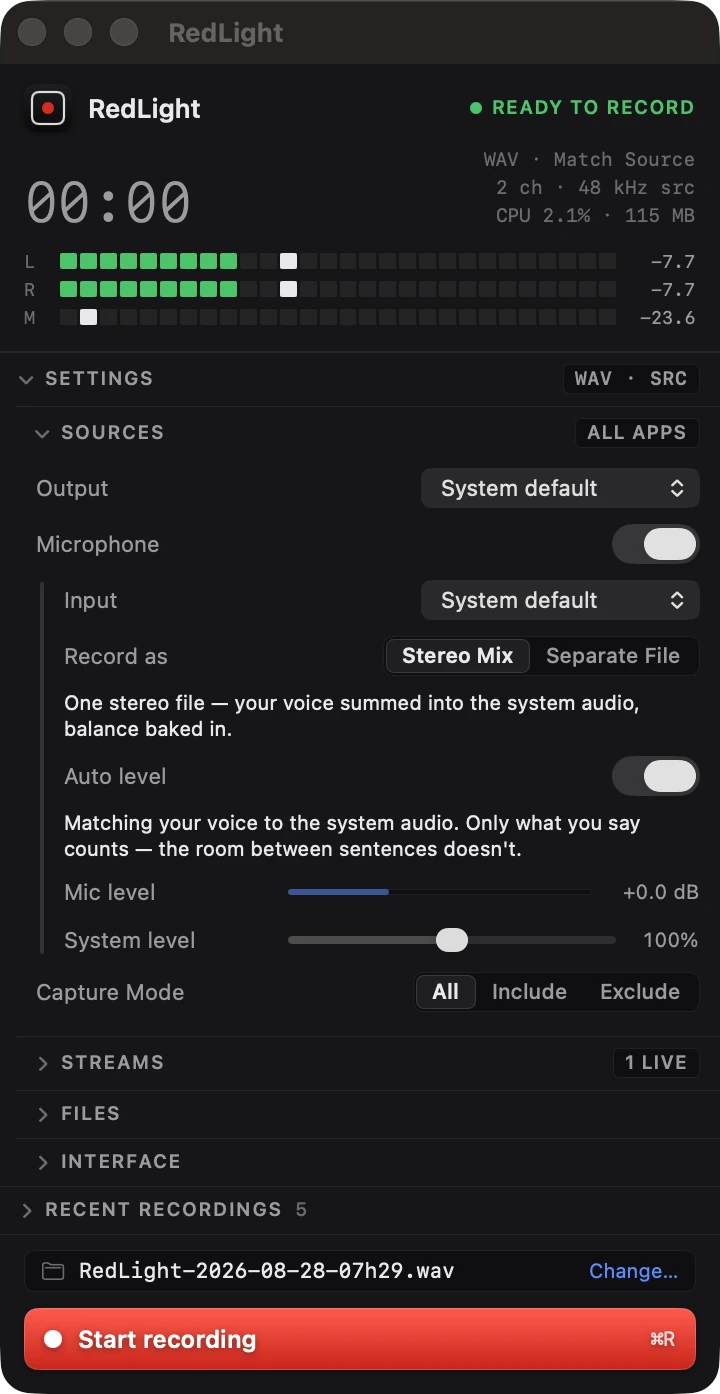
In RedLight open Sources and switch Microphone on, or click Microphone in the menu bar — it reads Enabled or Disabled at a glance. System audio is captured either way; this adds your side.
- Choose one file or two
Record as → Stereo Mix gives you a single file, ready to send. Separate File writes the call and your voice as two files of the same length — pick this if the recording is going to be edited, because every level decision stays reversible.
- Leave Auto level on
It sets your microphone against the call automatically, measuring only while you actually speak, with a limiter to catch the peaks. Nobody has to ride a fader mid-meeting.
Recording the call
Join the call first, then press Record — in the window, with ⌘R, or from the menu bar without leaving the meeting. A live timer sits in the menu bar for as long as capture is running, so there is no question later about whether it worked. Press Stop when the call ends and the file is finalised immediately.
For a long meeting, turn on chunking in Settings — a new file every 30 or 60 minutes keeps a three-hour workshop navigable. And if you would rather the recording skipped the waiting-room silence, silence handling can leave it out or split on it.
The AirPods problem
Turning on any microphone puts a Bluetooth headset into hands-free mode, which is 16 kHz mono in both directions. If you are also listening through that headset, macOS drops the call audio to match before RedLight ever sees it, and the whole recording sounds like a phone from 1998. This is Bluetooth Classic, not something software can undo.
Two ways round it: listen on a different output (wired headphones, or your Mac's speakers if you can tolerate a little bleed), or use a wired or USB microphone. RedLight raises a notice when it detects the mic running at a reduced rate, so you find out before the meeting rather than after.
Which apps this works with
All of them. RedLight captures at the Core Audio level, not through a plug-in or an integration, so it has no idea whether the sound is coming from Zoom, Teams, Google Meet in a browser tab, Slack huddles, Discord, FaceTime or a phone call routed through your Mac. If your Mac is playing it, RedLight can record it — and nothing needs to be enabled inside the calling app, which matters when you are a guest on someone else's meeting and the host controls its recording button.
Questions
Will the other people know I am recording?
Not from RedLight — it records outside the calling app, so no in-meeting recording banner appears. That is exactly why you should tell them: consent is a legal requirement in many places, not a courtesy.
Can I record a call I have been invited to but cannot record inside the app?
Yes. RedLight captures the audio your Mac plays, so it does not depend on the host granting recording rights in the meeting app. The consent rules above still apply.
My voice is much quieter than everyone else.
Leave Auto level on and RedLight balances your microphone against the call for you. To set it by hand, turn Auto level off and use the Mic level fader — and if your voice is quiet, pull System level down rather than pushing the mic up, which can clip.
Can I get their audio and my audio as separate tracks?
Yes — set Record as to Separate File. You get the call under the usual name and your microphone beside it ending in "-mic", the same length, so they line up in any editor.
Does it record video too?
No. RedLight is audio only. For a video capture of the meeting, use a screen recorder; for the audio, this gives you a clean, editable file at full quality.
Will a four-minute limit cut my meeting off?
In the free version, each recording stops at four minutes and what was captured is kept. RedLight Unlimited, a one-off in-app purchase, removes the cap — including part-way through a recording that is already running.
Related guides
Other things people record on a Mac.
Still stuck?
The full support page has the setup walkthrough, every setting explained, and the common fixes. Or email support@kernowlabs.com with your macOS version — we reply within two business days.
You are responsible for recording only audio you have the right to capture, and for obtaining any consent required where you are.